
Jorge Gomes, CTO and co-founder at Ludo.ai, breaks down its newest tools Keyframe Animation, one-click rigging, and 3D model animation, and explains how each one gives developers more precise control over the final result.
We talk to a lot of developers, and if there’s one thing we’ve learned over the past year, it’s that many teams have already made peace with AI belonging somewhere in their production pipeline. What’s changed is where exactly it’s earned a permanent place, and where it’s still catching up.
Sprites and audio are where small teams feel the gap most, which makes a lot of sense. These are persistent needs that are hard to fill without a dedicated artist, animator, or composer on staff, and we can see this by what our developers keep coming back to use.
But while these tools have earned their popularity, they haven’t closed every gap on their own. Our newest features, Keyframe Animation for sprites, along with one-click rigging and 3D model animation, are aimed at what’s still missing: fine-tuned control over motion that turns a generated asset into something that truly matches what a developer has in mind.
Source: Ludo.ai
Where teams lose the most time
A 2D pipeline looks simple on paper: concept, sprite, animation, implementation. But in practice, animation is where projects often slow down. Creating even a modest set of frames by hand for one character can take days, and for a team that’s mostly made up of engineers, this time can come out of the budget for the game itself.
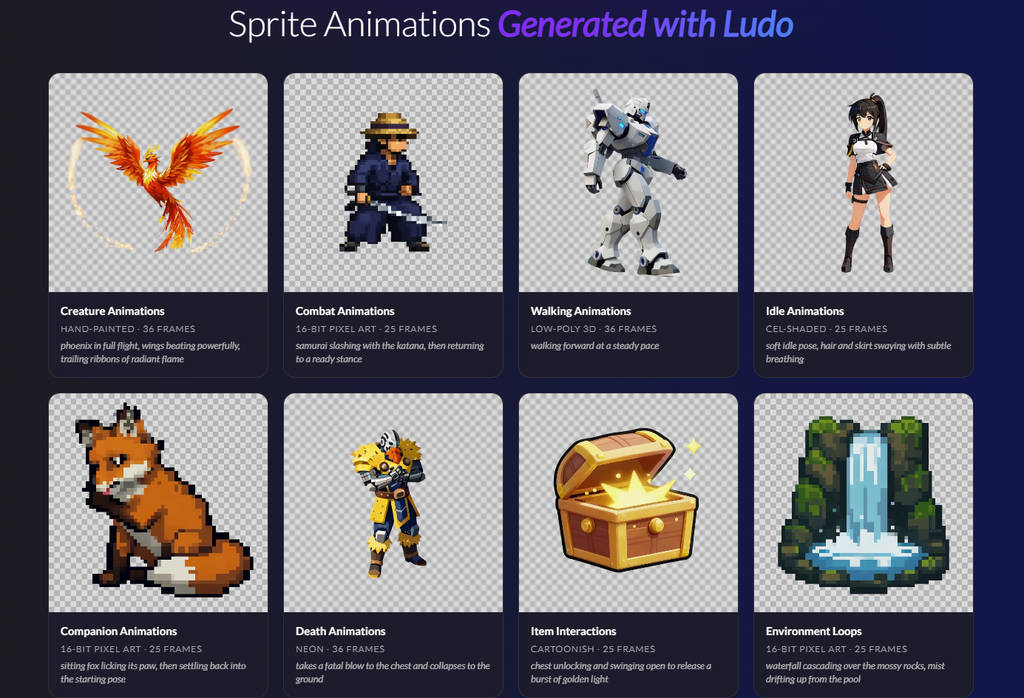
Our Sprite Generator was built with this exact problem in mind. A developer can go from a text description to a fully animated character with a downloadable sprite sheet in minutes, with no artistic or animation skills required. Users can simply describe a sprite, animate it with a motion prompt or a reference video, and export a sheet with atlas data ready for Unity, Godot, or GameMaker. There’s no drawing or manual rigging needed and Ludo handles both automatically (though a developer can still bring their own art into the process).
Audio works the same way, for many of the same reasons. A developer can describe a sound effect, a looping ambiance, a full music track (with their own lyrics if they want vocals), or even a character voice, human or otherwise, and get a high-quality asset back right away.
Both tools take something that used to require a specialist and put it in reach of a team of one or two people.
The latest step forward
This month we shipped Keyframe Animation, a new mode inside the Sprite Generator, and it’s exactly the kind of update I mentioned above.
Until now, a developer using the Sprite Generator could animate a sprite from a starting pose and a written description of the motion, with an option to set where the animation ends. What was missing was input on what happens in between. Keyframe Animation adds a middle pose to that sequence, so a developer sets the beginning, the middle, and the end, and we generate everything that connects them.
For an attack sequence, this means pinning the wind-up, the point of impact, and the follow-through as poses the developer defines themselves. And they don’t need finished artwork for every keyframe either. Ludo’s pose generation tools can build the starting, middle, and final poses from scratch, so a developer only needs to supply the one pose they care most about and then let the rest fill in around it.
The same idea, applied to 3D
Two other recent additions to our 3D pipeline follow the same idea: one-click rigging and 3D model animation.
Rigging has always been one of the more technical steps in bringing a 3D model to life, and it usually requires either specialized software or a dedicated technical artist. We’ve taken this requirement out of the production process, so any model in a developer’s library can now get an engine-ready skeleton in a single step. Once rigged, a model can be animated right away, either from a growing library of 640+ ready-made motions or from a plain text description for something the library doesn’t yet cover.
We’ve built each of our latest three features around the same instinct. If a developer can tell us precisely what they want to achieve, we’d rather handle the technical process ourselves and hand back something they can use right away.
Fewer roadblocks, more finished games
For teams already seeing results from our Sprite Generator and Audio Generator tools, Keyframe Animation should feel like a natural next step in a workflow they already know and trust. Developers are already putting these tools to work in shipped games.
The solo developer behind Tales of Honaria built out clan-wide creature voices and sprite animation for 150+ cards without an art or audio department, while the developer of Solo Grinding used the Sprite Generator’s transfer motion and change pose tools to animate a full enemy bestiary. The team behind Catverse Clicker also picked up Ludo halfway through development and built 60 animations in under three days.
And for teams already working in 3D, rigging and animation open up work opportunities that used to require specialist tools or hires.
Generation stopped being the hard part a while ago, and most teams already trust AI to produce a usable sprite, model, or sound. What we’ve wanted to target with these updates is precision, and getting what comes out the other end to match what a developer envisioned going in. If they can get this right, a developer can trust these tools the same way they’d trust any other part of their toolkit.
If you’re heading to this year’s Mobidictum Conference, come find us! We’d love to show you what our latest tools can do and hear more about what you’re building.
You can try Ludo’s Keyframe Animation tool here.